Click here to read an article on Dandelion reproduction. After reading, answer the questions on your Journal Article Review sheet.
Year: 2018
Forces Web Assignments
Work with a partner to complete the following assignments. Call me over and show me after you finish each one.
- Linear Net Force Game
- Car Acceleration from Forces
- Frictional Force – Car Stopping Distance
- Acceleration on An Incline With Friction
- BONUS!!!!
- pHet Springs lab
- Using the simulation, find:
- The spring constant of spring 1
- The mass of the red weight
- The mass of the green weight
- Acceleration due to gravity on Planet x
- Using the simulation, find:
- If you have extra time, try these two problems as well
- 2 Dimensional Motion – River Crossing Level 1
- 2 Dimensional Motion – River Crossing Level 2
Photosynthesis and Respiration Lab
Click the link below for today’s lab.
http://www.classzone.com/cz/books/bio_07/resources/htmls/virtual_labs/virtualLabs.html
Intro to Photosynthesis Webquest
Working with a partner, click on this link to open a document. Visit the websites listed and answer the questions.
Remember forces?


So I’m out again today. I’ve left you some of your favorite things to do!! Sorry Avery. 😦
Log into MasteringPhysics.com.
There are three assignments. The first two are called Pre-Lecture assignments for chapter 6 and 7. There is an optional short video to watch for review and then some conceptual review questions.
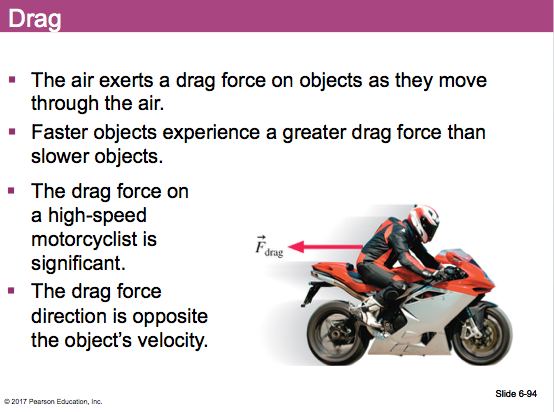
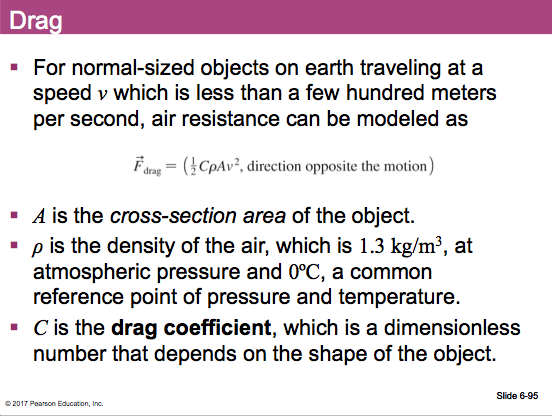
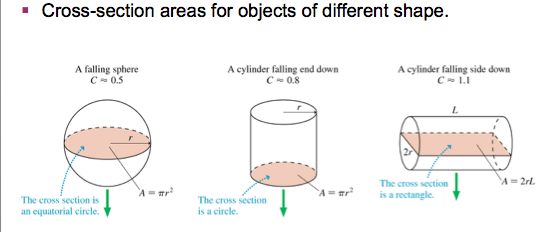
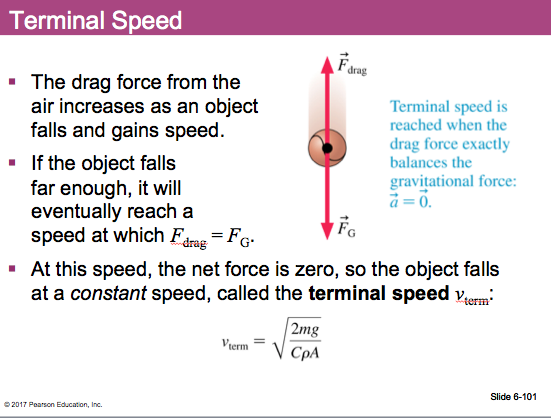
The third one is called “CH 06 HW.” The last few questions are about drag forces and terminal velocity. We haven’t covered that yet in class, but there are some notes on that topic below that should be enough to help you answer the questions.
Projectile Motion Activities
I’m out again today for more curriculum writing… 😦
While I’m gone, work with a partner to complete the following tasks.
PART 1 – Crime Scene Investigation Using Projectile Motion:
- Click here to go to the lab activity for today. Type your answers into that document and share it with me when you finished it
PART 2 – Drone Delivery Problem:
- Click here to complete this PhysicsAviary assignment. When completed, send me a screenshot of the final page that said you were correct.
- Be careful!! Every time you reload the page you get different numbers and the acceleration due to gravity is probably NOT 9.81 m/s2. Make sure you click on the “Show Question” button to see the correct acceleration.
PART BONUS – Vertical Motion of a Firework:
- Click here to complete this PhysicsAviary assignment. When completed, send me a screenshot of the final page that said you were correct.
- Be careful!! Every time you reload the page you get different numbers and the acceleration due to gravity is probably NOT 9.81 m/s2. Make sure you click on the “Show Question” button to see the correct acceleration.
Motion Challenge!!!!
Try this PhysicsAviary assignment with a partner. You have to get all ten questions correct in order to be successful so take your time. Remember, direction matters for vectors!!
After successfully completing the challenge, take a screenshot of your final screen that says you did it and email it to me with you and your partner’s name.
As a reminder:
- Velocity = displacement / time
- Speed = distance / time
- Speed is a scalar so it should not have a negative sign because the negative sign just tells us direction.
Cell Organelle Activity
Click here to go to the website to build your own cell. Follow along on your data table, filling in the function of the organelle in your own words and indicating whether it is found in a plant or animal cell or both.
Intro to Video Analysis
We’ll be doing some video analysis in Capstone today. Woot woot.
LAB REPORT: (in a Google Doc that you share with me.)
Part I: For the rolling ball video:
- Was the ball moving at a constant velocity? Provide evidence from your video analysis.
Part II: For the analysis of the video that you make with your partner:
- Insert a screenshot of the horizontal position vs time graph.
- What is the general shape of this graph? What does that mean?
- What is the slope of the line? What does that mean?
- Insert a screenshot of the vertical position vs time graph.
- What is the general shape of this graph? What does that mean?
- Insert a screenshot of the vertical velocity vs time graph.
- What is the slope of this graph? What does that mean?
Bounce!!
Here’s the skeleton of the bounce program. Copy and paste into a new program.
from visual import *

floor = box (pos=vector(0,0,0), length=4, height=0.1, width=4, color=color.blue)
ball = sphere (pos=vector(0,10,0), radius=2, color=color.magenta)
ball.velocity = vector(0,0,0)
dt = 0.01

#the 1 after the while is interpreted as "true" when this program runs,
#basically turning this into an infinite loop.
#The loop is obviously incomplete, but think about what you would need to add
#to make this ball "bounce." It should accelerate at 9.81. You will need to
#include an if/else argument.
while 1:
 rate (100)
 ball.pos = ball.pos + ball.velocity*dt
 Barlow Academy